- Who We Help
-
Capabilities
Product DesignProduct DevelopmentAIGrowth & SupportProduct DesignProduct DevelopmentSoftware DevelopmentWeb Application Development (SaaS, PWA, Portals)Full Stack DevelopmentEnterprise Software DevelopmentDatabase Architecture & EngineeringWeb Development ServicesCMS DevelopmentSoftware Architecture & WireframingMobile App DevelopmentSoftware DevelopmentWeb Application Development (SaaS, PWA, Portals)Full Stack DevelopmentEnterprise Software DevelopmentDatabase Architecture & EngineeringWeb Development ServicesCMS DevelopmentSoftware Architecture & WireframingAIGrowth & SupportSoftware & App Maintenance Website Maintenance Performance Optimization (Speed, UX, Code) App Store Optimization (ASO) Feature Iteration & Versioning Conversion Rate Optimization (CRO) Analytics Setup & Reporting CRM & 3rd Party Tool Integration Tech Support & SLA-based Services Security Audits & Compliance
- Solutions
- Industries
- Design-Ops
- Technologies
- Company


UX Design For Kids: How to Make a Product Kids Will Love
March 2, 2023 | Read Time : 3 mins
Table of Contents
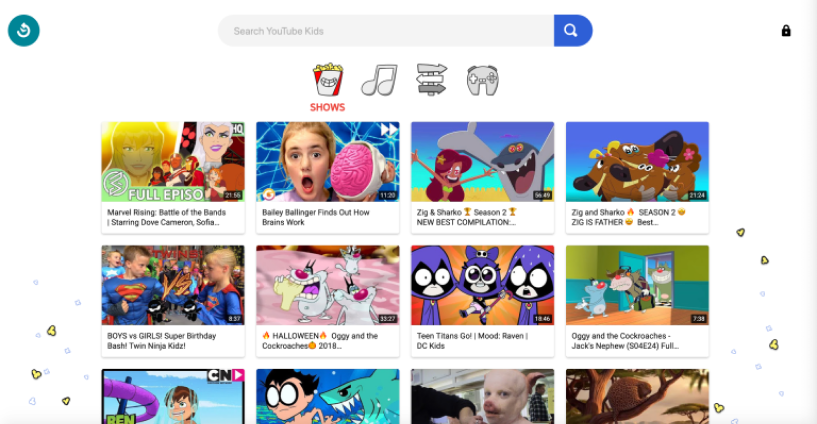
The ideal apps for kids integrate design components to offer entertaining, enriching experiences that are age-appropriate and parents can appreciate.
Let’s look at the guiding principles for designing an app for kids
Create enjoyable and rewarding experiences
Adventures for kids may be enjoyable and informative. Develop hands-on activities that connect kids and spark curiosity.
Design for kids of different ages and abilities
Make your design age-appropriate but also accessible for the youngest user. kids of various ages have varying motor and cognitive abilities.
Test the assumptions
The involvement of engaged parents who play together with their kids might boost their positive experience with content. Think about how to involve parents in the event.
Keep conversations organized, clear and consistent
Draw a clear picture
Create enjoyable and rewarding experiences
kids of all ages have a range of cognitive capacities, so make sure you employ a variety of sound, pictures, and text to convey feedback once the child completes an activity. Most kids under the age of five cannot read and may not know how to switch on the sound if it is off.
Use standard iconography
Common buttons like home, play, pause, and stop are likely to be well-known to many kids. Use text, images, and sounds in addition to one primary instructional method.
Start with what’s most important
Make sure the most crucial content is at the top of the page, and then imply that there’s more information if you scroll down.
Take action to assist
Create a delightful interface
As kids finish a task, use rewarding images, animation, and music to keep them interested and motivated.
Make positive mistakes
Let the child immediately reengage with the experience while providing encouraging auditory and visual cues.
Use visual cues
Whenever a kid selects the wrong answer, you may help them by presenting strong visual indications such as arrows, highlights, or pulses that indicate to the right answer. As kids under the age of five normally cannot read, refrain from using text to point out mistakes.
Put accessibility first
Make the experience accessible to disabled kids.

AUTHOR
Team OriginUX
OriginUX Studio is a CoE for User Experience providing UI & UX across Product, Service and Customer Experience Design. We are a cross-disciplinary design team that loves to create great experiences and make meaningful connections for businesses and their users through UI & UX.
Founded in 2016, our larger purpose is to help brands understand what they want to do and where they want to go. To do that we have to make understanding customer experience simple, effortless, and affordable for everyone.
Related Articles

November 16, 2023
UX Design Strategies That Can Redouble Your Retention
User Experience (UX) plays a pivotal role in retaining users. A well-designed UX can keep users engaged, satisfied, and...

June 14, 2023
Digital Information: A Trap or a Treasure
Introduction In an era of rapid technological advancements and unprecedented access to information, the digital landscape has become a...

June 14, 2023
The future of electronic wallets and payments: Changing how we pay
Introduction In an increasingly digital world, electronic wallets and payments have emerged as key drivers of financial innovation. With...

OriginUX studio is based out of Bangalore, India.
We are a cross-disciplinary design team that loves to create great experiences and make meaningful connections for businesses and their users through UI & UX.
Industries we serve
© OriginUX Studio 2016 - 2026